Webhook-driven workflows: connect your KB to Slack, Jira, and everything else
Automating knowledge base updates and notifications is no longer a luxury, but a necessity for efficient operations. Outbound webhooks transform your KB from a static repository into an active participant in your critical workflows.
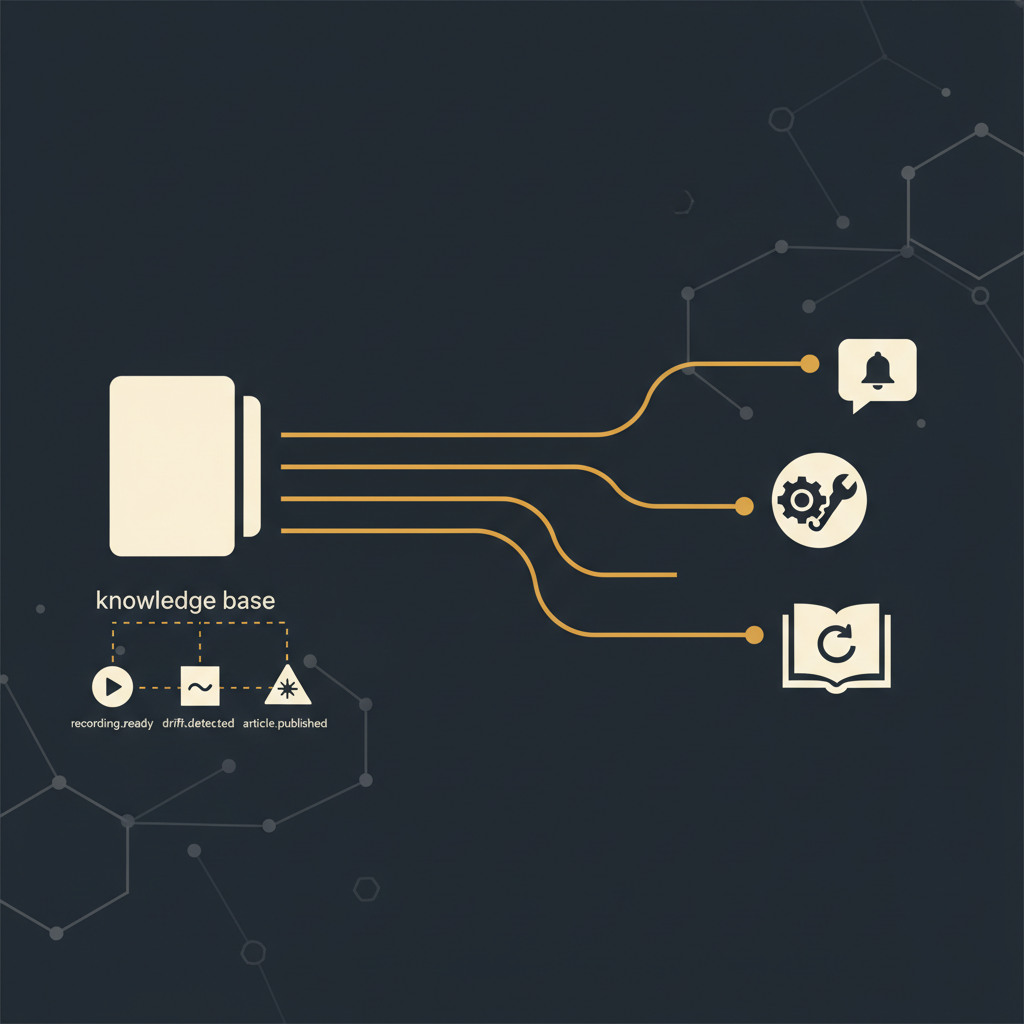
A knowledge base (KB) is often seen as a static repository, a place where information goes to reside, occasionally retrieved for reference. This passive role, while functional, falls short of the demands placed on modern operational teams. In an environment where processes and interfaces change frequently, a KB needs to be an active, integrated component of your workflow. The traditional model of manually checking for updates or relying on tribal knowledge to disseminate new information is inefficient, prone to error, and ultimately costly. The solution lies in making your KB proactive, connecting it directly to the systems and teams that need to react to its lifecycle events.
The Imperative of an Active Knowledge Base
For too long, knowledge bases have been treated as archival systems. Content is created, published, and then largely forgotten until a user explicitly seeks it out or reports an inaccuracy. This reactive posture creates significant friction. Support teams might answer questions based on outdated procedures, engineering teams might build on incorrect assumptions, and operations leaders struggle to ensure consistency across their teams. The cost of outdated or inaccessible information manifests in increased support tickets, longer resolution times, and repeated errors.
An active knowledge base, by contrast, is a living system. It signals its own changes, demands attention when it needs maintenance, and integrates seamlessly with the tools your teams already use. This shift from passive repository to active participant is not about adding complexity, but about removing manual overhead and ensuring information integrity at scale. Webhooks are the primary mechanism for achieving this integration, providing a standardized, real-time method for your KB to communicate with the rest of your operational ecosystem.
Core Webhook Events for Operational Agility
Effective integration begins with granular control over the events that matter. A robust knowledge base platform should expose specific, actionable events via outbound webhooks. Three events stand out for their immediate operational impact:
article.published: This event fires when a new article is successfully published or an existing article undergoes a significant update and is re-published. This is the signal that new or revised knowledge is available and ready for consumption. The payload typically includes the article ID, its title, a direct URL, the author, and a timestamp.recording.ready: For platforms that capture and process walkthroughs, this event is crucial for content pipeline management. It triggers when a new recording has been processed, transcribed, and is ready for a content creator to review, edit, or transform into an article. The payload would include the recording ID, a link to the raw recording, and relevant metadata about the recording session.drift.detected: Perhaps the most impactful event for maintaining accuracy, this fires when the underlying user interface (UI) documented in an article has changed, indicating potential 'drift' from the documented state. This proactive alert is invaluable. The payload should provide the article ID, its URL, details about the detected change (e.g., a link to a visual diff report), and the severity of the drift. This event fundamentally shifts KB maintenance from reactive user reports to proactive system alerts.
Each of these events represents a distinct opportunity to automate a critical workflow, moving away from manual checks and ad-hoc communication.
Automating Notifications: Slack and Beyond
The most straightforward application of webhooks is for real-time notifications. Consider the common scenario of a new article being published. Without automation, the dissemination relies on email lists, internal announcements, or teams stumbling upon the new content. This is inefficient.
With an article.published webhook, you can instantly notify relevant teams. A common pattern involves sending a message to a dedicated Slack channel (e.g., #kb-updates). The webhook payload can be parsed to construct a concise message:
{ "text": "New KB Article Published: <https://kb.yourcompany.com/article/12345|Onboarding Flow for New Hires> by John Doe. Review the updated process here."}
This ensures that every team member subscribed to that channel is immediately aware of critical updates. Similarly, the recording.ready event can alert content teams in a separate Slack channel (#content-creation) that a new walkthrough is available for processing, streamlining the content pipeline. This reduces the latency between content creation and content consumption, ensuring teams operate with the most current information available.
Proactive Maintenance: Connecting Drift to Jira
The drift.detected event represents a significant operational advantage. Instead of waiting for a user to report an outdated article, the system proactively identifies the discrepancy. The challenge then becomes how to efficiently act on this information. Integrating with a task management system like Jira is a robust solution.
When a drift.detected webhook fires, it can trigger the creation of a new Jira ticket. The webhook payload contains all necessary information to populate the ticket:
{ "fields": { "project": { "key": "KB" }, "summary": "KB Article Drift Detected: 'Customer Onboarding Process'", "description": "The UI documented in article <https://kb.yourcompany.com/article/54321> has changed. Review the drift report here: <https://kb.yourcompany.com/drift-report/54321> and update the article.", "issuetype": { "name": "Task" }, "assignee": { "id": "kb-content-owner-id" }, "labels": ["KB-Maintenance", "Drift"] }}
This automatically assigns the task to the relevant content owner or team, providing a clear audit trail and ensuring the issue is tracked to resolution. Without this automation, drift often goes unnoticed for extended periods, leading to significant user frustration and operational inefficiencies. The proactive nature of this integration ensures that your knowledge base remains accurate and reliable, reducing the time spent identifying and remediating outdated content from days or weeks to hours.
Beyond Notifications: Synchronizing Knowledge Across Systems
While notifications are powerful, webhooks enable more complex data synchronization workflows. Imagine a scenario where specific KB articles need to be mirrored or summarized in other internal systems, such as a Confluence space for broader company policies, a CRM system for sales enablement, or a custom internal tool.
When an article.published event occurs, a webhook can trigger a custom script or an integration platform (like Zapier or Workato) to:
- Fetch the full content of the article using the KB's API (using the article ID from the webhook payload).
- Transform the content to suit the target system's format requirements (e.g., converting HTML to Markdown for Confluence).
- Push the transformed content to the relevant destination.
This ensures that critical information is consistently available across all necessary platforms without manual copy-pasting, which is inherently error-prone and time-consuming. For instance, a new product feature walkthrough published in the KB could automatically generate a summary page in Confluence for cross-functional awareness, or update a training module in an LMS. This level of integration transforms the knowledge base into a central source of truth, propagating its updates across the entire organizational data landscape.
The era of isolated knowledge bases is drawing to a close. Operational efficiency demands that documentation actively participates in the daily rhythm of your business, signaling its changes and integrating seamlessly with your existing tools. By embracing webhook-driven workflows for events like article publication, recording readiness, and crucially, drift detection, organizations can transition from reactive content management to a proactive, automated approach. This ensures accuracy, reduces manual effort, and ultimately empowers teams to operate with confidence, relying on information that is always current and integrated.
Stop writing docs nobody reads.
Record them instead.
Install the extension, walk through the tool you're tired of explaining. Tome Robot does the rest.